Thursday, October 13, 2016
Microsoft OneNote
Microsoft OneNote is an electronic notebook that is perfect for storing all kinds of information about any subject. Whether you're learning a new subject, planning renovations at your home or taking notes at a business meeting you are attending, OneNote provides the perfect set of tools for collecting and organizing information.
Information is organized into notebooks. Each notebook contains sections that can be congregated into section groups. Sections contain pages and subpages. Information can be searched across notebooks or a specific page making it easy to track down notes on a specific topic.
OneNote's set of tools make it easy to store all types of information. Options include:
- To-do lists
- Tables
- File printouts
- File attachments
- Screen clippings
- Pictures
- Audio
- Video
- Timestamps
- Equations
- Symbols
- Drawings
One of the best features is the ability to research a topic online or in files you or someone else has created. When you copy information from a website or file (Word, PowerPoint, Excel, etc.), OneNote creates a link to the source document or website! It makes it simple to retrace your steps to find where the info came from and to see it in context.
Learn more at www.onenote.com or take a class with Launch!


Microsoft OneNote
Microsoft OneNote is an electronic notebook that is perfect for storing all kinds of information about any subject. Whether you're learning a new subject, planning renovations at your home or taking notes at a business meeting you are attending, OneNote provides the perfect set of tools for collecting and organizing information.
Information is organized into notebooks. Each notebook contains sections that can be congregated into section groups. Sections contain pages and subpages. Information can be searched across notebooks or a specific page making it easy to track down notes on a specific topic.
OneNote's set of tools make it easy to store all types of information. Options include:
- To-do lists
- Tables
- File printouts
- File attachments
- Screen clippings
- Pictures
- Audio
- Video
- Timestamps
- Equations
- Symbols
- Drawings
One of the best features is the ability to research a topic online or in files you or someone else has created. When you copy information from a website or file (Word, PowerPoint, Excel, etc.), OneNote creates a link to the source document or website! It makes it simple to retrace your steps to find where the info came from and to see it in context.
Learn more at www.onenote.com or take a class with Launch!
Monday, November 16, 2009
Microsoft Surface

Microsoft has developed a horizontal user interface that allows users to manipulate data on the screen using their hands. Content can be dragged from location to location on the screen. Several people can sit in front of the screen and collaborate in new ways.
Microsoft's website lists four key capabilities that make it such a unique experience
Direct interaction. Users can grab digital information with their hands and interact with content on-screen by touch and gesture – without using a mouse or keyboard.
Multi-user experience. The large, horizontal, 30 inch display makes it easy for several people to gather and interact together with Microsoft Surface - providing a collaborative, face-to-face computing experience.
Multi-touch. Microsoft Surface responds to many points of contact simultaneously - not just from one finger, as with a typical touch screen, but from dozens of contact points at once.
Object recognition. Users can place physical objects on the screen to trigger different types of digital responses – providing for a multitude of applications and the transfer of digital content to mobile devices.
You can see a video of Microsoft Surface in action at http://www.microsoft.com/surface/Pages/Product/WhatIs.aspx.
Monday, February 25, 2008
Google Maps Street View
Google Maps has a new view to add to Terrain, Satellite, Map and Traffic. It's called Street View and it provides the view you would have if you walked down the street. You can turn around 360 degrees and walk from block to block. You can zoom in and out too!
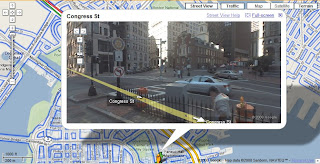
Go to http://maps.google.com/ and type in an address. (Unfortunately, not all streets have been photographed yet.) Click the Search Maps button. Then, click the Street View link. Click on the arrows to move down the street.

Go to http://maps.google.com/ and type in an address. (Unfortunately, not all streets have been photographed yet.) Click the Search Maps button. Then, click the Street View link. Click on the arrows to move down the street.
Sunday, October 21, 2007
View Turn by Turn Directions on Google Earth from the Air
Google earth provides satellite imagery and maps of our planet. It can be downloaded for free at http://earth.google.com.
A new feature makes it possible to not only display turn by turn directions but to actually view satellite imagery of the route as if you were flying above it in a helicopter. Wow!
1. Download and open Google Earth.
2. Click the Directions tab of the Sidebar on the left side of the screen. If it isn't visible, press Ctrl + Alt + B.
3. Type a starting address in the From box and an ending address in the To box.
4. Click the Begin Search icon. It looks like a magnifying glass.
5. Click the Play Tour icon. It looks like the same kind of right pointing triangle you have on your CD player.
6. Enjoy the tour!
A new feature makes it possible to not only display turn by turn directions but to actually view satellite imagery of the route as if you were flying above it in a helicopter. Wow!
1. Download and open Google Earth.
2. Click the Directions tab of the Sidebar on the left side of the screen. If it isn't visible, press Ctrl + Alt + B.
3. Type a starting address in the From box and an ending address in the To box.
4. Click the Begin Search icon. It looks like a magnifying glass.
5. Click the Play Tour icon. It looks like the same kind of right pointing triangle you have on your CD player.
6. Enjoy the tour!
Thursday, August 09, 2007
Tuesday, May 15, 2007
Create Your Own Visited Countries/States Map
Visit the link below to create a map of the countries you have visited!

Create your own visited countries map

Create your own visited states map
Create your own visited countries map
Create your own visited states map
Friday, April 13, 2007
Watch What Can Be Done in MS Paint!
If you've ever wondered just how much can be accomplished using MS Paint, you need to see this video.
Tuesday, October 04, 2005
ABYZ News Links
Imagine somthing newsworthy happens in the world. You could just go to the same news sites you usually visit but you can already predict how they will react to events. Instead, consider going to news sites from other countries as well to get a more balanced account of events.
Check out ABYZ News Links at http://www.abyznewslinks.com/. You'll find everything from online versions of your town or college newspaper to news sites from around the world. ABYZ describes itself as a "portal to online news sources from around the world." In addition to newspapers you'll find broadcast stations, internet services, magazines, and press agencies. The sites have versions in the country's native language as well as several other popular languages (English is always included).
You might be surprised how media outlets in different places report the same news!
Check out ABYZ News Links at http://www.abyznewslinks.com/. You'll find everything from online versions of your town or college newspaper to news sites from around the world. ABYZ describes itself as a "portal to online news sources from around the world." In addition to newspapers you'll find broadcast stations, internet services, magazines, and press agencies. The sites have versions in the country's native language as well as several other popular languages (English is always included).
You might be surprised how media outlets in different places report the same news!
Tuesday, July 05, 2005
Wikipedia, the free encyclopedia
Wikipedia (http://www.wikipedia.org/) describes itself as the free-content encyclopedia that anyone can edit. Yup, you heard right, anyone can edit it. That means you can edit it.
Wikipedia is based on the concept that collectively we know more about a subject than a few experts. So, if you happen to know a lot about fly fishing, find the page and add to or change the information you find. All you have to do is click the "edit this page" tab at the top of the page and make your changes. Click "save page" and your changes will appear to the next viewer of the article.
There are more than 1.6 million articles in 200 different languages (about 100 of which are active). There are more than 600,000 articles in the English version alone. Wikipedia even has a method for dealing with vandalism of its pages. A history tab enables users to revert a page to a previous version if obvious vanadalism has occured.
Try it youself and have fun!
Wikipedia is based on the concept that collectively we know more about a subject than a few experts. So, if you happen to know a lot about fly fishing, find the page and add to or change the information you find. All you have to do is click the "edit this page" tab at the top of the page and make your changes. Click "save page" and your changes will appear to the next viewer of the article.
There are more than 1.6 million articles in 200 different languages (about 100 of which are active). There are more than 600,000 articles in the English version alone. Wikipedia even has a method for dealing with vandalism of its pages. A history tab enables users to revert a page to a previous version if obvious vanadalism has occured.
Try it youself and have fun!
Friday, May 13, 2005
Google SMS
Here's some info from Google's own site about a product called Google SMS. It comes from Google Labs, the section of Google that allows users to try prototypes of programs that "aren't quite ready for prime time".
Go directly to their site at http://www.google.com/sms/ or continue reading below.
What is Google SMS?
Google SMS (Short Message Service) enables you to send queries as text messages over your mobile phone or device and easily get precise answers to your questions. No links. No web pages. Just text — and the information you're looking for:
Get local business listings when you're on the road and want to find a place to eat.
Obtain driving directions to get from point A to point B without having to ask for directions.
Find movie showtimes and theater locations of movies currently playing near you.
Check weather conditions and 4-day forecasts to plan your day.
Get quick answers to straightforward questions.
Study the latest stock quotes and stay on top of the market.
Compare online product prices with ones you find in retail stores.
Look up dictionary definitions to expand your vocabulary or prove a point.
How do I use it?
Enter your query as a text message. See some sample queries.
Send the message to the US shortcode 46645 (GOOGL on most phones).
Receive a text message (or messages) with your results, usually within a minute. Results may be labeled as "1/3", "2/3", etc.
To get Google SMS help info sent directly to your phone, send the word 'help' as a text message to 46645.
Go directly to their site at http://www.google.com/sms/ or continue reading below.
What is Google SMS?
Google SMS (Short Message Service) enables you to send queries as text messages over your mobile phone or device and easily get precise answers to your questions. No links. No web pages. Just text — and the information you're looking for:
Get local business listings when you're on the road and want to find a place to eat.
Obtain driving directions to get from point A to point B without having to ask for directions.
Find movie showtimes and theater locations of movies currently playing near you.
Check weather conditions and 4-day forecasts to plan your day.
Get quick answers to straightforward questions.
Study the latest stock quotes and stay on top of the market.
Compare online product prices with ones you find in retail stores.
Look up dictionary definitions to expand your vocabulary or prove a point.
How do I use it?
Enter your query as a text message. See some sample queries.
Send the message to the US shortcode 46645 (GOOGL on most phones).
Receive a text message (or messages) with your results, usually within a minute. Results may be labeled as "1/3", "2/3", etc.
To get Google SMS help info sent directly to your phone, send the word 'help' as a text message to 46645.
Wednesday, May 11, 2005
Library Spot
Launch Software Training & Consulting Blog
Where can you find everything from film libraries to government libraries? Where can you find everything from public records to top museums? Library Spot of course! Check it out at www.libraryspot.com.
Where can you find everything from film libraries to government libraries? Where can you find everything from public records to top museums? Library Spot of course! Check it out at www.libraryspot.com.
Monday, May 09, 2005
Welcome!
I'm happy to welcome you to the Launch Software Training & Consulting Blog. This is a space where people interested in business software can share their thoughts, questions, successes and frustrations with other like minded people.
If I run into any particularly interesting websites or computer tricks, I'll be sure to pass them on. Feel free to do the same.
Jamie Storella
If I run into any particularly interesting websites or computer tricks, I'll be sure to pass them on. Feel free to do the same.
Jamie Storella
Subscribe to:
Posts (Atom)